



Machining Navi, with clear visuals of complex cutting conditions, is a breakthrough tool that enables the machine operator to navigate the machine and tool capabilities to their best performance levels.
Benefits
Maximizing machine tool performance
With graphical representation of machine performance, the operator can easily select optimal cutting conditions.
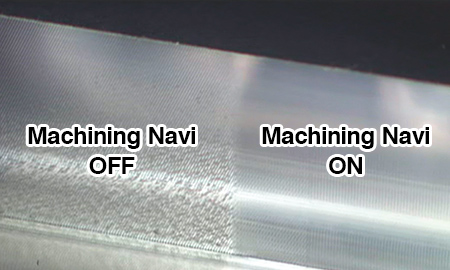
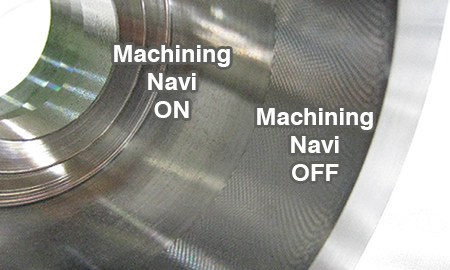
Tailored approaches for different types of machine tool
Optimizing spindle speed
Especially suitable for high-speed milling applications, to effectively suppress chatter by shifting rpm's to an optimum, and even faster chatter-free zone.
(Machining Navi, M-i, M-gⅡ, M-gⅡ+)
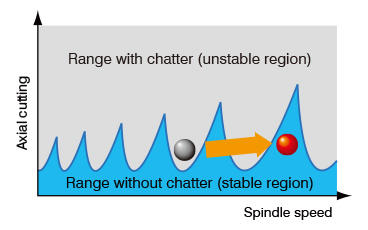
Raising the low-speed threshold— [milling and turning applications]
Increasing milling or turning spindle speeds in the slow zone requires a different approach to suppress chatter. Okuma's solution provides a wider stable region for faster cutting in the low-speed zone.
(Machining Navi, M-i, M-gⅡ+, L-gⅡ)
![Raising the low-speed threshold— [milling and turning applications]](/english/solution_technology/process/images/p_process04_sp.jpg)
Four types of Machining Navi easily guide customers
-
Machining Navi M-i
(intelligently optimized spindle speed control)- Simple, auto-mode—leave it to the machine
- Finding optimum cutting conditions quickly
-
Machining Navi M-gⅡ
(guided optimization of spindle speed)Machining Navi M-gⅡ+
(guided optimization of spindle speed/harmonic control)- Adjust cutting conditions while monitoring the data
-
Machining Navi L-gⅡ
(guided, harmonic spindle speed control)- Chatter-free applications for lathes
-
Machining Navi T-g (threading)
- Threading chatter can be easily controlled by anyone
Cutting condition search function for milling
Machining Navi M-i (intelligently optimized spindle speed control)
Simple, auto-mode—leave it to the machine (Auto Control)
Chatter vibration is measured by builtin sensors, and Machining Navi automatically changes spindle speed to the optimum speed. In other words, vibration measurement, optimum spindle speed calculations and spindle speed adjustments are then made automatically.
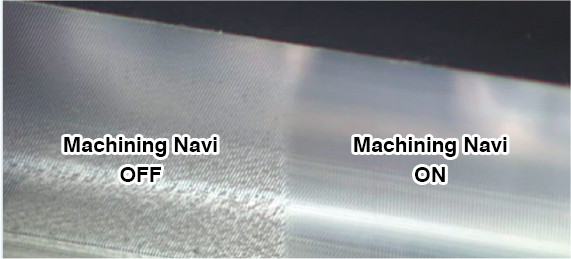
Three easy steps
Machining Navi M-i functions very simply. Just three steps are required to get the best cutting conditions.
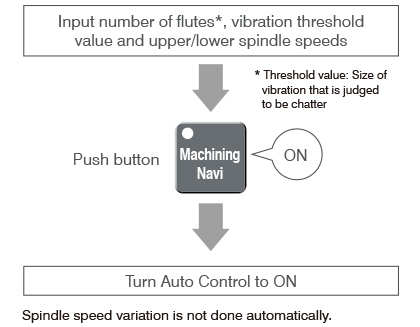
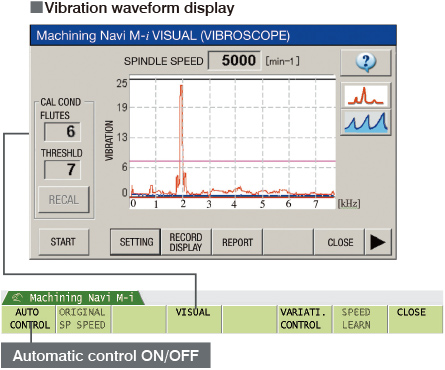
Finding the best cutting conditions quickly
Advanced graphics of the optimal cutting conditions represent effective alternatives to suppress various chatter characteristics throughout the low to high speed zones. In addition to Auto Control, this can be used as a tool to raise cutting conditions even further.
- Effective measures are displayed
- Sensors built in to the machine detect and analyze machining chatter. Machining Navi then navigates to the effective measures in a wide range of spindle speeds, from low to high.

Cutting condition search function for milling
Machining Navi M-gⅡ (guided optimization of spindle speed)
Machining Navi M-gⅡ+ (guided optimization of spindle speed/harmonic control)
Adjust cutting conditions while monitoring the data
Based on the chatter noise captured by the microphone, Machining Navi displays a number of optimal spindle speed possibilities on the screen. The operator can change to the indicated spindle speed with a single touch and immediately confirm the result.
- Navigate to suitable countermeasures
- Navigation to effective countermeasures is done by detecting and analyzing machining chatter with a microphone attached to the machine. M-gⅡ displays its effect mainly against high-speed chatter, while M-gⅡ+* is also effective against low-speed chatter.
- * Machining Navi M-gⅡ is available only with double column machining centers.

Cutting condition search function for turning
Machining Navi L-gⅡ (guided, harmonic spindle speed control)
Chatter-free applications for lathes
Chatter in a lathe can be suppressed by changing spindle speeds to the ideal amplitude and wave cycle—without decreasing spindle speed. With Machining Navi L-g , spindle speed fluctuation patterns were optimized based on the chatter suppression principle. This has improved the tool length limit by 10% in the following example.
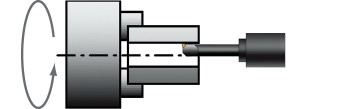

Customer expertise enhances operations

Note: Screen illustrations may differ from the actual display.
Cutting condition search function for milling
Machining Navi T-g (threading)
Threading productivity is improved while costs are kept down
When chatter occurs in threading, general methods to resolve the problem have been to either lower cutting conditions at the expense of productivity, or to use special chatter-resistant tools at some cost. Machining Navi T-g (threading) provides optimum control, increasing or decreasing spindle speed on each pass to inhibit the periodic vibrations that are a cause of chatter.
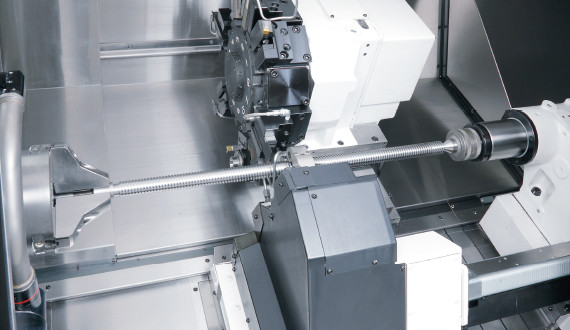
Threading chatter can be quickly and easily controlled by anyone
With Machining Navi T-g (threading), a change to the best cutting conditions is made in 3 simple steps.
Current and recommended threading conditions are shown on a visual graphics screen for navigation to chatterless threading.

- Example of Machining Navi T-g (threading)
- Chatter occurs and machining is stopped even when an auto follower rest is used in threading of long materials of L/D = 23. With Machining Navi “ON,” good machined surfaces are obtained by machining the remaining paths even with workpieces in which chatter had occurred.
- Workpiece: ø34 × 798 mm
- Material: S45C
- Square threading: Auto follower rest was used.
<Chatter during threading>
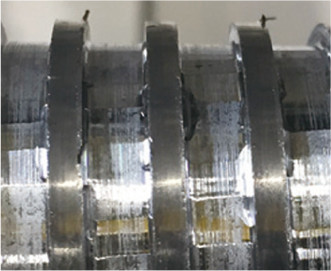
- Spindle speed
-
- 1st pass: 1400
- 2nd pass: 1400
- 3rd pass: 1400
- 4th pass: 1400
- ·
- ·
- Chatter
occurrence
<Machining Navi T-g>
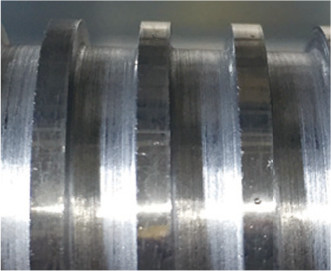
- Spindle speed
-
- 1st pass: 1680
- 2nd pass: 1120
- 3rd pass: 1680
- 4th pass: 1120
- ·
- ·
- Threading
completed


